Choose how people pay you, make it look like you, and share one link or one code. Customers pay by card through Stripe, straight to you, or they pay you directly and you record it. Either way, Much Obliged keeps the record and shows you what's next.
$8 a month to get paid. 0% platform fee. Much obliged.
Piano teachers, tutors, cleaners, lawn care, coaches, repair.
Use one. Use all of them. Same price.
In your dashboard these sit under Audience, Sell and Work. Creative Work is under Sell, and Offers under Work. Tell us which ones you use and Much Obliged puts them first. Nothing is switched off, and you can change this any time.
The tools
Here's each one, from both sides of the counter.
What you do, what your customer sees, and what's good to know. In every case your customer pays you without an account or an app.
Audience · People support what I do
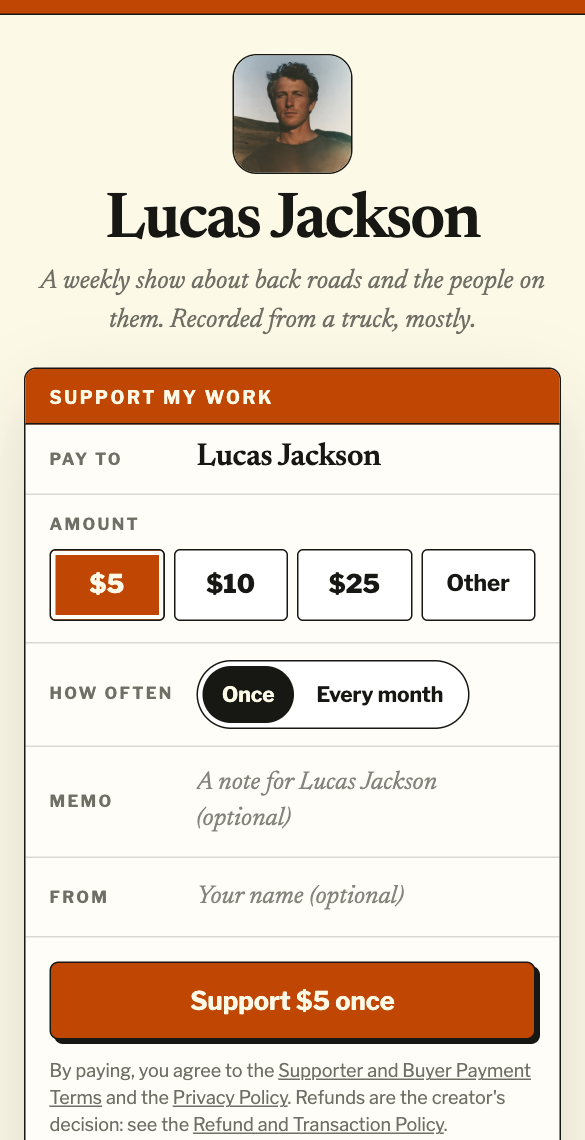
Let people support what you do.
You
Make your page: up to 20 links, your photo, your story, in one of five layouts (Story, Masthead, Ledger, Bold or Card), Light or Dark. Publishing it is free; on its own it's a page of your links.
Start Much Obliged ($8 a month). Turn on one-time support, monthly support, or both. Pick three suggested amounts; people can always choose their own.
Want more? Offer one membership. You set the price and say what members get.
Members pay by card through Stripe, and Much Obliged keeps track of who's a member. You provide what they joined for. Much Obliged can add and remove a Discord role for you, show private instructions once they've paid, or leave access to you.
Your supporter
Opens your page, picks an amount, and pays on Stripe's checkout. They can add a note and their name.
Sees your thank-you message once the payment is confirmed.
Cancels monthly support or updates their card from their own link. No account, ever.
Your page is free; links only until you start the $8
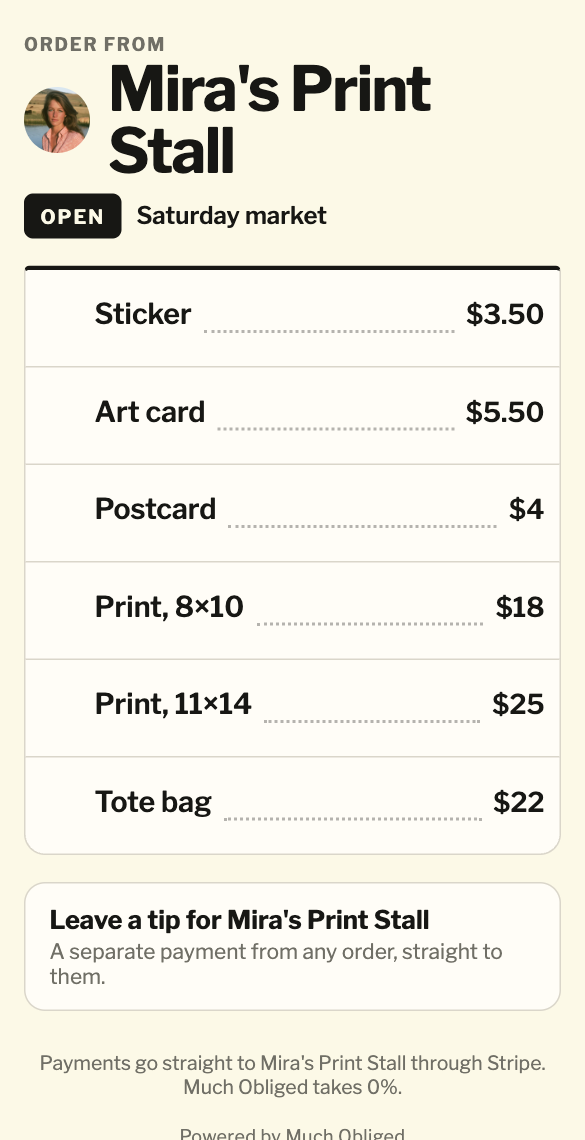
Add what you sell, up to 40 items, each with a price. Use a custom item for anything that isn't on the list.
Tell us what you sell once (most kinds of selling switch on right away). Then open for the day on your phone, tablet or laptop: your code starts working the moment you open.
Ring it up and turn the screen around, or let customers order from your printed code. Took cash? Tap Record cash.
Your customer
Scans, taps what they want, and pays on their own phone. No app to download.
Sees your name and logo at the top, and the total before they pay.
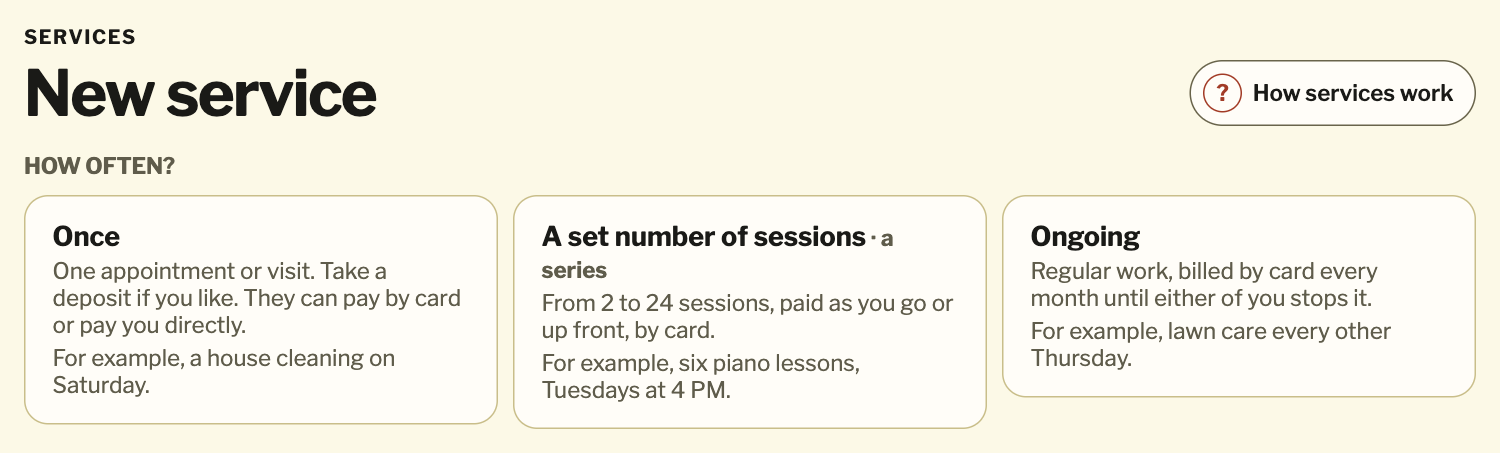
Every service starts with one question: how often? Answer it and Much Obliged sets up the rest.
Once
House cleaning on Saturday, $140: $40 to book, and $100 when the work's done. They confirm the booking on one link, and they can pay by card or pay you directly.
A set number of sessions
Six piano lessons, Tuesdays at 4 PM, $45 a session, paid as you go. They accept once and pay each session on the same link. Nothing is charged automatically. Much Obliged calls this a series.
Ongoing
Billed every month until either of you stops it. Lawn care every other Thursday, $160 a month by card. They agree once. Much Obliged calls this an ongoing service.
You
Mark sessions and visits complete, with a note if you like.
See what's next and what's still to collect.
Stop a series and keep what was already done and owed.
Your customer
Sees “Session 3 of 6”, what's due, and your notes.
Can stop an ongoing service any time from their link.
Changed phone? You can send them a one-time link to continue.
Your dashboard: Services starts with one question.
2 to 24 sessions in a series
Only the ongoing kind is billed automatically
Sessions and ongoing services are paid by card, so they need Stripe
You set the dates; Much Obliged doesn’t send reminders
One page for each piece of your work, with every way someone can get it from you: a print, the original, a commission, or a license on terms you set. Buying is paid by card, straight to you. A request is a message to you: nothing is charged, and nothing is granted until you both agree.
Much Obliged keeps a dated Work Record of each image you upload. It doesn't establish copyright, authorship or when the work was made.
Up to five offers on one page, on its own link or on your website. Pay Now is a set price, paid in full by card. Ask Me is a short message: nothing is charged, and you agree the details before any work or payment.
A regular at your stall can scan your tip code. The tip goes to your support page, separate from the order.
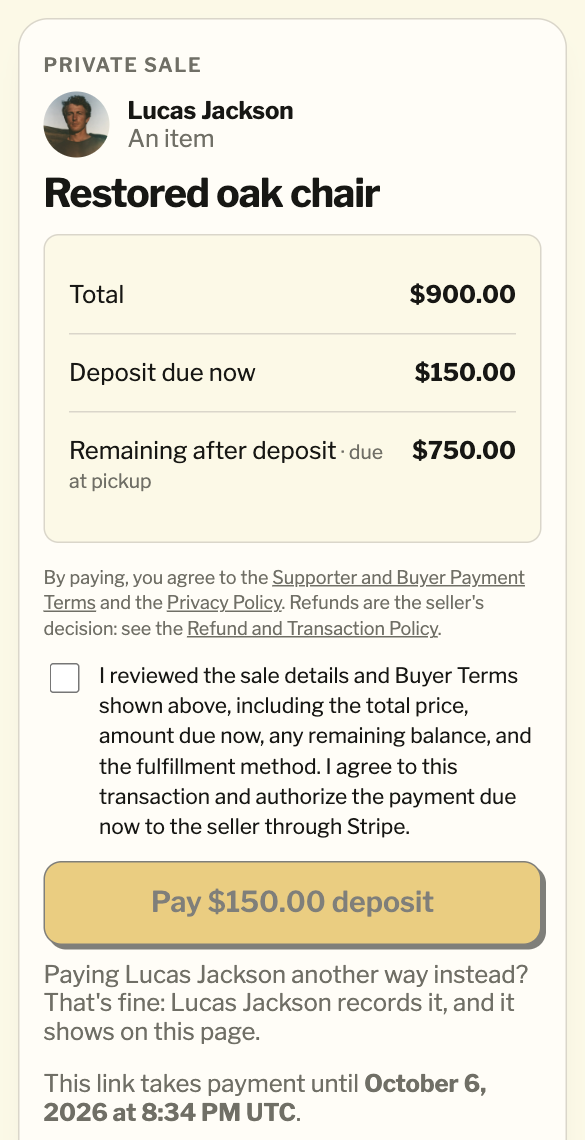
Too big or one of a kind for the Counter? Make it a Private Sale.
Already posted it somewhere? Bring it in from your listing instead of typing it again.
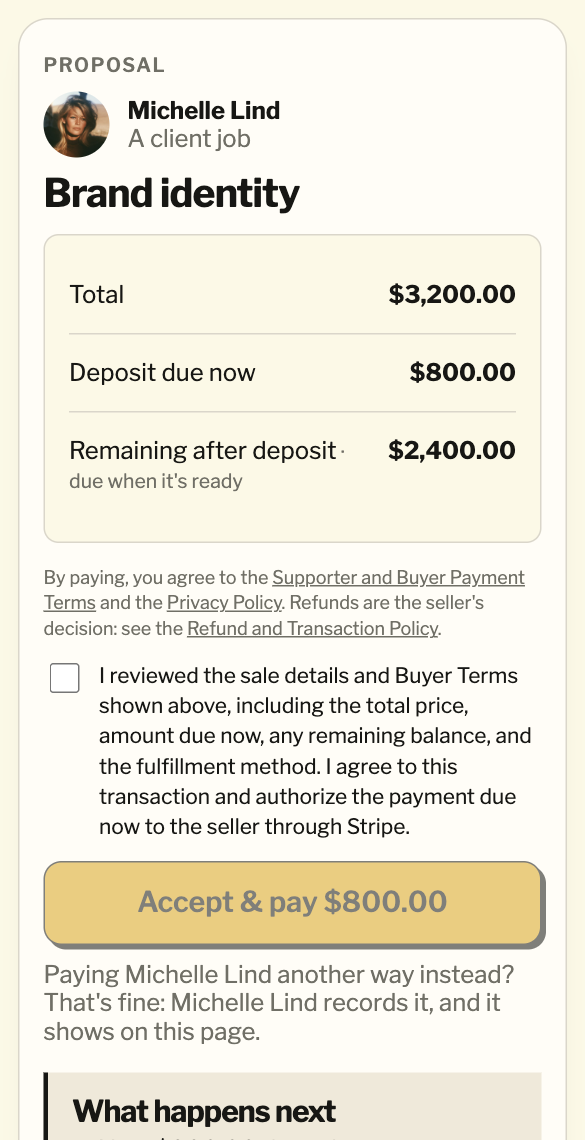
Someone asked about an offer or a piece of your work? When you've agreed the details, turn their message into a Private Sale or a client job.
Good client? Work with them again starts the next job filled in. A booking went well? Book again.
Your dashboard is laid out the same way as this page: Audience for the people who back you, Sell for what you sell, Work for jobs and services. Every page your customers see carries the same name and logo. One download holds all of it, and the same $8 covers every way you get paid.
Getting started
What you need, and when.
Your page is free. Getting paid is $8 a month. Stripe only matters when you want cards.
FreeMake your page, publish it, share it
Your name, your photo, what you do and up to 20 links, in one of five layouts and the color you like. Publish it, share the link or the QR code, and change it any time. No card needed.
$8 a monthStart Much Obliged
Get paid: support on your page, your Counter, private sales, proposals and bookings. One price for getting paid. Cancel anytime, and your page stays up.
When you want cardsConnect Stripe for card payments.
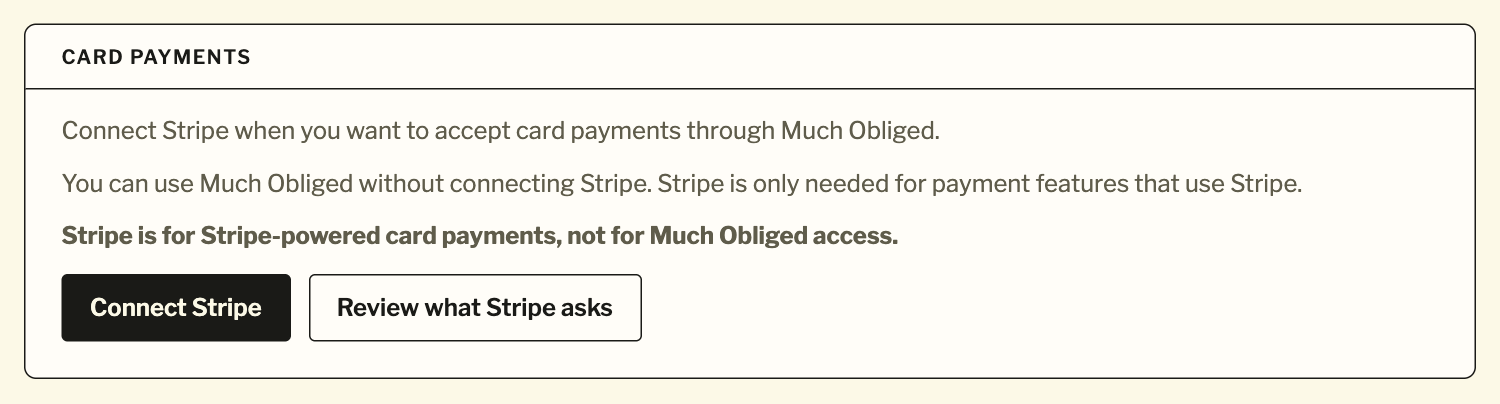
Stripe is the payment account behind card payments. Connect it whenever you're ready. Until then you can record cash and take payments made to you directly.
Selling or taking on work? The first time you do, Much Obliged asks what you sell. It takes a minute, and for most people the selling tools switch on as soon as they answer. A few kinds of selling, like food and drink, cosmetics or work that needs a licence, are read by a person first.
Your dashboard shows the same things at the top of every page: whether your page is live, whether card payments are set up, and anything that needs you.
Make it yours
Make it look like you.
Your customers should recognize you before they notice us.
Your page
Your name or business name, a photo, a cover, your color, a line about what you do, your story, and links to wherever else you are.
Your sales, client jobs, services and Counter menu
Your logo, your website, and how buyers can reach you.
Card checkout and statements
The public name on your Stripe account. Much Obliged tells you if it doesn't match the name your customers see here.
Much Obliged stays small, at the bottom: “Powered by Much Obliged Co..”
No logo? Your photo or your initials stand in. A personal name or a business name, either works.
In your bio, your newsletter, under your videos, in your DMs.
A QR code
On a flyer, a sticker, a table card, a business card. It opens your page.
Your website
With Much Obliged started, add a support widget in one of three sizes, matched to your colors and type. Your offers can sit there too, compact or detailed. Checkout opens in a new tab.
Your Counter code
One printed code that never changes. Print signs from Counter, or put the same link on an NFC sticker so a tap works like a scan.
One link per deal
Every sale, job and service gets its own private link, plus a QR code for proposals and bookings and a ready-written message to paste into your conversation.
Much Obliged doesn't send anything on your behalf. You share it where the conversation already is.
Already have a website?
Keep it. Add the widget or a link, and let it carry on doing its job.
No website?
Your Much Obliged page works on its own: share the link, or print the QR code. If Stripe asks for a website or online presence, your Much Obliged page can do that job.
In your dashboard: Audience, under Share Your Page.
The money
Much Obliged keeps the record. Stripe moves the money.
Card payments you receive go to your connected Stripe account. Much Obliged doesn't hold your money.
Paid directly with cash, Zelle, Venmo or a check? The money goes from them to you. You record it, and it goes in the record.
Your payments and your Much Obliged subscription are separate.
Supporter or customer→Stripe→You
And the one thing you pay Much Obliged:
You→$8/month→Much Obliged
Two kinds of paid. Never mixed.
Confirmed by Stripe
A card payment Stripe reported as paid.
Recorded by you
Money you say you received another way. Much Obliged didn't process it and doesn't pretend to have checked it.
Much Obliged platform fee: $0. Standard payment-processing costs are separate. Your customer pays your price, and Much Obliged adds nothing.
In Much Obliged
Who paid
What it was for
Payment status
Refunds and disputes in context
Analytics and records
In Stripe
Payment processing
Stripe processing fees
Bank details
Payout settings
Payment methods
Dispute responses
Make $50 or $50,000. Much Obliged is still $8.
Stripe
Card payments, when you want them.
Much Obliged is the software. Stripe is the payment account behind card payments. Much Obliged doesn't hold your money. Stripe is for Stripe-powered card payments, not for Much Obliged access. You don't need it to publish your page, or to run the parts of your business that are paid to you directly.
Works without Stripe
Needs Stripe
Your page, published
One-time and monthly support
Counter: recording cash and payments made elsewhere
Memberships
Private Sales paid to you directly
Card payments at your Counter, including ordering by phone and tips
Client jobs paid to you directly
Card payments on Private Sales, client jobs and one-time services
One-time services paid to you directly
Sessions in a series, and ongoing services
Your page is free. Everything else in both columns needs Much Obliged to be started ($8 a month).
Nervous about Stripe? Here's what it actually asks.
You don't need an LLC. If you're getting paid as yourself, choose the individual or sole proprietor option.
You may not need an EIN. On the individual path, Stripe can use your SSN or ITIN.
Stripe checks who you are, not Much Obliged. We never receive your identity documents, tax ID, date of birth or bank details.
You don't need your own website. A public profile, shop or portfolio can be your online presence, and so can your Much Obliged page.
You don't have to publish your home address or a personal phone number.
Stripe decides what it needs, and its questions vary by account. Much Obliged can't approve a Stripe account. Your payouts follow the payout schedule on your Stripe account.
Getting paid is part of the job. Not the end of it.
Much Obliged keeps track of what's left: what's due, what's ready, what's been handed over, what's done. Open it and know where things stand.
Link ready
Paid in full
Handed over
Making it
Balance due
Session 3 of 6
Billing current
Recorded by you
Still to collect
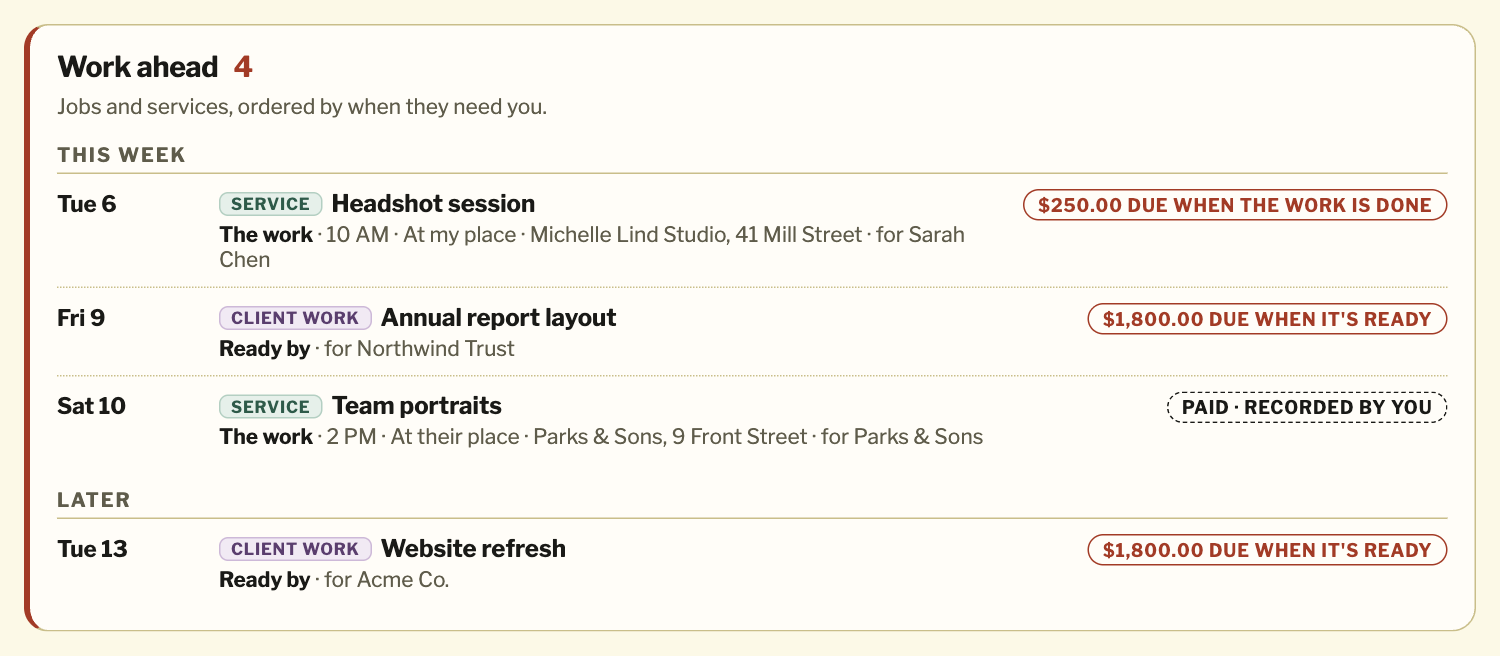
What needs you: pickups, ready-by dates, balances due and sessions coming up, shown where they belong and gathered on your Overview.
Paid and handed over are different things. A PIN records the handoff at pickup. “Mark work complete” records a finished service.
Every sale, job and service keeps its own timeline: what was agreed, what was paid, and what happened, in order.
Analytics: what came in, what repeats each month, and what Much Obliged costs you.
Downloads: spreadsheets of your sales, Counter orders and work, a PDF record of each sale, and an evidence packet if a card payment is disputed.
Refunds and dispute responses happen in your Stripe account. Your records update when Stripe says so.
Your dashboard: Work ahead. Example names.
No mystery math.
No lock-in
Your business stays yours.
Card payments land in your own Stripe account, with its own dashboard and history.
Download everything Much Obliged keeps for you, any time, in one file. That's your page, supporters and members, sales, Counter days, client jobs, services and every payment.
Cancel anytime. If you stop, your records stay, deals you already made can still be finished, and you can still download everything.
Coming from Buy Me a Coffee, Linktree or Patreon?
We bring over what your public page shows, and tell you anything we couldn't.
Coming from Ko-fi or somewhere else?
Paste your links, set Much Obliged up beside it, and move new support when you're ready.
Your page is free. Getting paid is $8 a month, with a 0% platform fee and nothing to add on. Standard payment-processing costs are separate.
Is my page really free?
Yes. Build it, publish it, edit it and share it, with your link and a QR code, in any of the five layouts. No card and no Stripe. Taking payments on it is $8 a month.
Do you take a percentage of what I make?
No. The Much Obliged platform fee is 0% on everything: support, sales, client work and services. Make $50 or $50,000. Much Obliged is still $8.
Do my customers pay a fee?
No. They pay your price, and Much Obliged adds nothing.
Can I cancel?
Yes, any time. Your page stays up, and your records stay; you can still download them. Billing and cancellation
Stripe
Do I need Stripe?
Only for card payments. Stripe is for Stripe-powered card payments, not for Much Obliged access.
Without it you can publish your page and, with Much Obliged started, record cash at your Counter and take private sales, client jobs and one-time services paid to you directly. Support, memberships, series and ongoing services are paid by card, so they need Stripe.
Do I need an LLC or an EIN?
Usually not. If you're getting paid as yourself, Stripe offers an individual or sole proprietor path, which can use your SSN or ITIN. Stripe decides what it needs. The Stripe setup guide
Does Much Obliged see my SSN or bank details?
No. Stripe collects and checks them. We never receive your identity documents, tax ID, date of birth, bank details or Stripe login.
When do I get paid?
Card payments go to your Stripe account and pay out on the payout schedule set there.
Using it
Do I have to use all five?
No. Use one. Use all of them. Same price. Tell us which ones you use and Much Obliged puts them first. Nothing is switched off, and you can change this any time in Settings.
Can I start selling straight away?
For most kinds of selling, yes.
The first time you sell or take on work, Much Obliged asks what you sell. It takes a minute, and your selling tools switch on when you finish. A few kinds of selling, like food and drink, cosmetics or work that needs a licence, are read by a person first. Your page and support work in the meantime.
Do I need a card reader or any hardware?
No. Counter runs in the browser on the phone, tablet or laptop you already have, and customers pay on their own phones.
Can I take cash?
Yes. At the Counter, and on Private Sales, client jobs and one-time services when people pay you directly. It shows as “Recorded by you”: Much Obliged didn't process it or check it.
Can I take a deposit?
Yes, on Private Sales, client jobs and one-time services. That's one fixed amount now and the exact rest later. A series can take a deposit, with the rest due after the last session.
Will it charge my customers automatically?
Only monthly support, memberships and ongoing services, which renew until they're stopped. Everything else is paid when your customer chooses to pay, on their link.
Will strangers find me on Much Obliged?
No. Much Obliged is not a marketplace: you bring your own customers, and Much Obliged makes it simple for them to pay you.
Do I need a website?
No. Your Much Obliged page works on its own: share the link, or print the QR code. If Stripe asks for a website or online presence, your Much Obliged page can do that job. Already have a website? Keep it, and add the support widget once you've started Much Obliged.
Can I use my logo?
Yes. Your logo, website and contact details appear on your sales, client jobs, services and Counter menu. Your page uses your photo, cover and color.
Can I ship things?
Yes, within the United States. You set a flat shipping amount and a ship-by date, buy the postage yourself, and add the tracking number. Much Obliged doesn't sell labels.
Is there a booking calendar?
No. You set the dates for a booking or a series. Much Obliged keeps them with the agreement and shows what's next. It doesn't send reminders.
Who can use Much Obliged?
Creators and sellers based in the United States, 18 or older.
Your customers
Does my customer need an account?
No account and no app. They open your link and pay or confirm there.
Does Much Obliged email my customers?
No. You share the link in your own conversation. Their page is their receipt, and Stripe can email a card receipt depending on your Stripe settings.
Leaving and arriving
What happens if I stop paying?
Your page stays up, without support on it. You keep your records and can download them. Deals you already made can still be finished. You can't start new ones until you start again.
Can I bring my page from Buy Me a Coffee, Linktree or Patreon?
Yes. Paste your page's address and we read it once: your name, about and links in order, your suggested amounts when they're in US dollars, and one membership (Much Obliged has one). You see what came over, and what we know didn't, before you use it. Your picture and cover come too. Before it goes live, you confirm the old page is yours by putting a short code on it. From Ko-fi or anywhere else, paste your links: you see which came over, and we name any we could see but couldn't bring.
Monthly supporters start fresh on your Much Obliged page; keep your old page until they do.
Can I export my data?
Yes. Download everything in one file any time, plus spreadsheets of your sales, Counter orders and work.
Your page is free.Get paid when you're ready.
$8 a month to get paid. 0% platform fee. Much obliged.